Safe Browsing on the Internet: The Complete 2026 Guide
Introduction
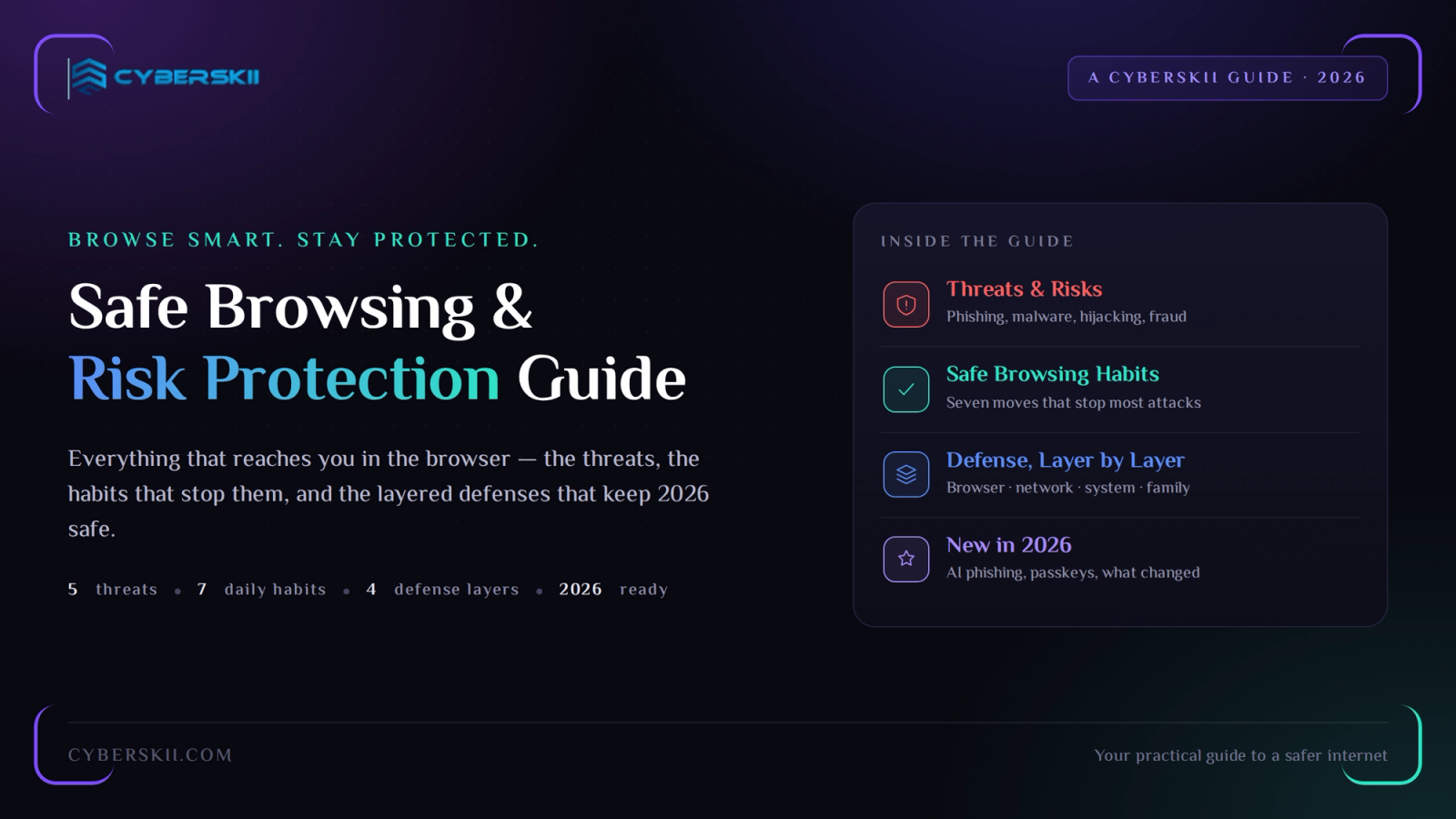
In our digital era, the internet has become an inseparable part of our daily lives. We use it for communication, learning, work, shopping, entertainment, and much more. But with easy access to information come increasing online risks. Hackers and cyber criminals can steal your personal data, damage your device, or even deceive you to get your money.
In this article we cover safe browsing on the internet and tips to avoid risks and threats in 2026.
What Is Safe Browsing on the Internet?
Safe Browsing is a set of practices and tools that protect the user during internet usage from accessing malicious sites, exposure of personal data, malware infection, or falling victim to fraud.
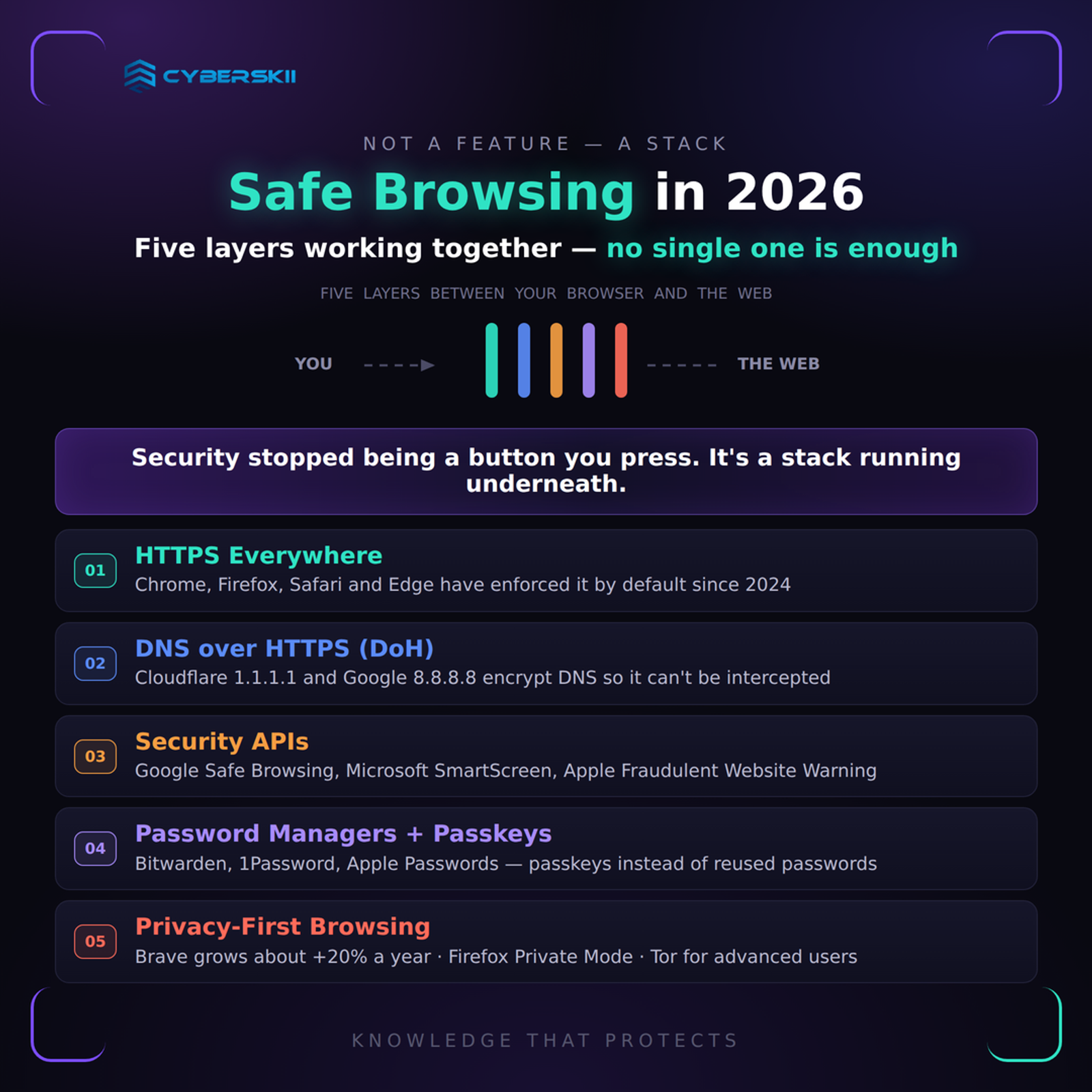
In 2026, safe browsing isn’t a “feature” the user enables — it’s an integrated system of (HTTPS, DNS, Security APIs, Password Mangers, Privacy-First Browsing).
Online Browsing Threats and Risks
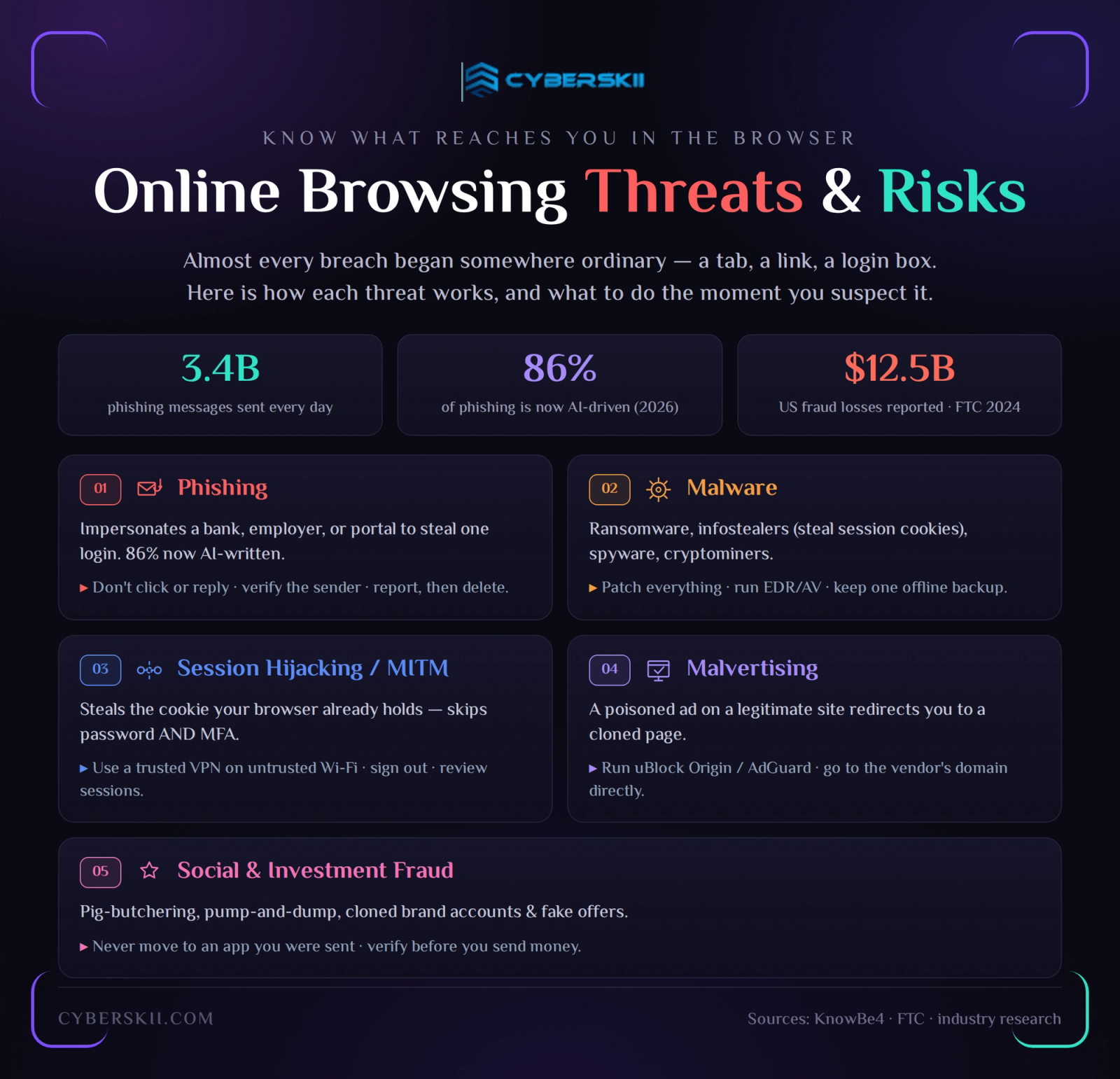
Almost every breach that reaches a headline began somewhere ordinary: a tab, a link, a login box. The threats below are the ones that actually reach people in the browser — how each one works, how to recognise it, and what to do the moment you suspect it.
Phishing
Phishing is the theft of trust before the theft of data. The attacker impersonates something you already rely on — your bank, your employer, a courier, a government portal — and asks for one small action: a login, a confirmation, a payment.
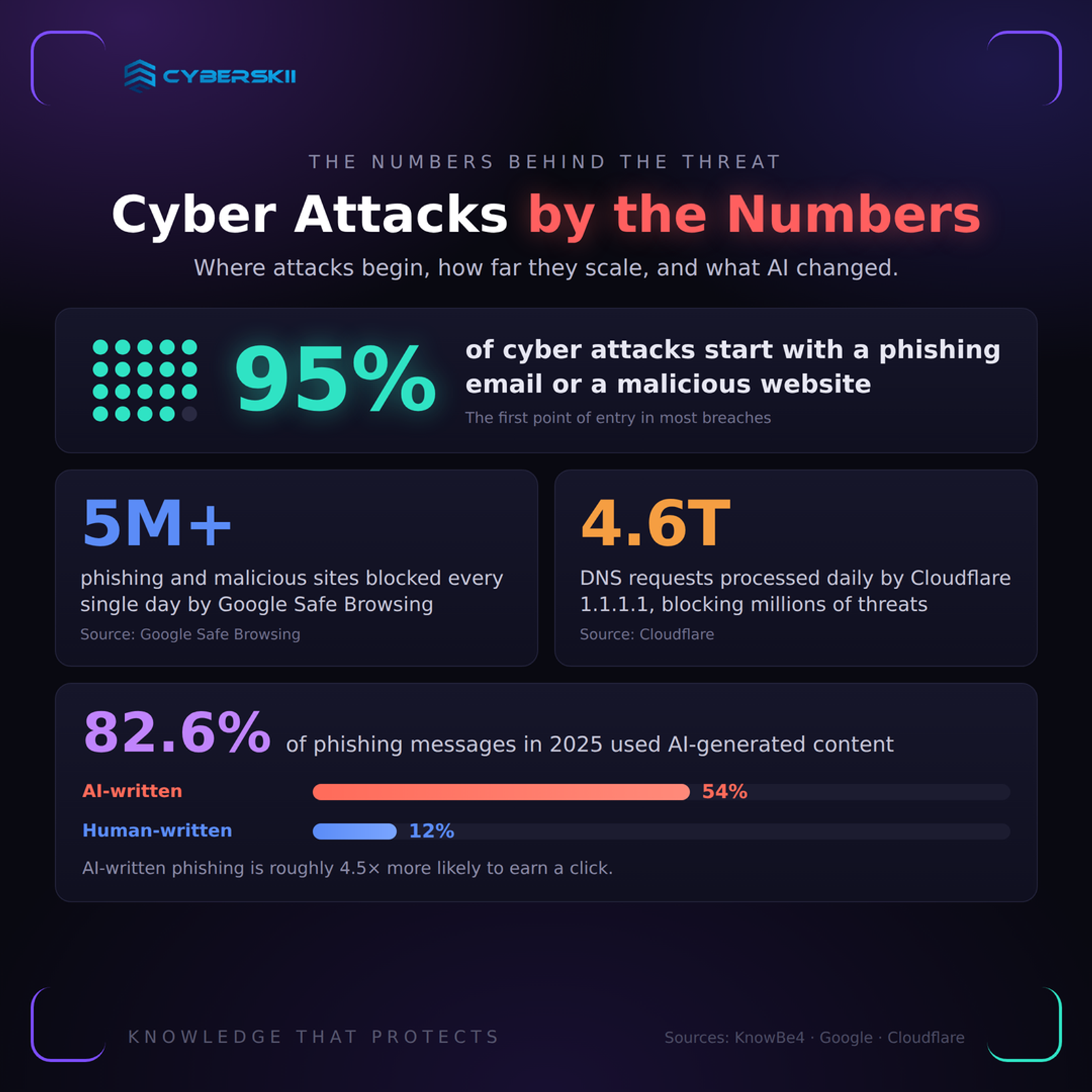
An estimated 3.4 billion phishing messages are sent every day. According to KnowBe4's 2025 Phishing Threat Trends Report, 82.6% of the phishing emails analysed showed some use of AI-generated content, and the company's 2026 research puts the share of AI-driven phishing attacks at roughly 86%. The consequence is practical: the grammar mistakes and clumsy translations people were trained to look for have largely disappeared.
The main variants.
| Variant | Delivery | Target |
|---|---|---|
| Bulk phishing | Anyone, at volume | |
| Spear phishing | Email, LinkedIn, WhatsApp | A named individual, researched in advance |
| Whaling / BEC | Email, often spoofed internally | Executives and finance approvers |
| Smishing | SMS, WhatsApp, iMessage | Mobile users, usually with a shortened link |
| Vishing | Voice call, increasingly AI-cloned | Help desks, finance staff, elderly relatives |
| Quishing | QR code on a poster, invoice, or menu | Anyone who scans without checking the domain |
What to do when one reaches you.
- Do not reply, click, or unsubscribe — any interaction confirms the address is live.
- Capture evidence: a full screenshot, the sender's real address, and the message headers if it is email.
- Report it: use the "Report phishing" control in Gmail or Outlook, report the account to the platform, and notify your IT or security team if it arrived on a work device.
- If money or credentials were already entered, treat it as an incident: change the password from a different device, revoke active sessions, contact your bank immediately, and file a report with the relevant authority — in Saudi Arabia, through the Ministry of Interior's Kollona Amn channel, and with your organisation's SOC if applicable.
- Only then delete the message.
Malware
Categories that matter in a browser context.
- Ransomware — encrypts files and, in most modern campaigns, exfiltrates them first for double extortion.
- Infostealers — the quiet growth category: they harvest saved passwords, session cookies, and crypto wallets, then sell the bundle. A stolen session cookie can bypass multi-factor authentication entirely.
- Mercenary spyware — Pegasus, Predator and similar toolkits, aimed at journalists, activists, and executives rather than the general public.
- Trojans and worms — legitimate-looking software that carries a payload, or self-propagating code that spreads across a network without a click.
- Cryptominers — silently consume CPU and battery to mine currency for someone else.
How infection actually happens?
- Drive-by downloads — a compromised or malicious page delivers a payload through an unpatched browser or plugin flaw.
- Watering-hole attacks — the attacker compromises a site a specific community trusts (an industry portal, a supplier's download page) and waits.
- Malicious installers — cracked software, fake "update" prompts, and unofficial app stores.
Thus, Keep the operating system and browser patched; run reputable endpoint protection (EDR in an organisation, a maintained antivirus at home); block macro execution from the internet; and keep at least one backup copy offline or otherwise isolated from the network, because that is the only control that reliably answers ransomware.
Session Hijacking and Man-in-the-Middle
Modern session theft rarely involves cracking encryption. It involves stealing the session cookie your browser already holds — through an infostealer, a malicious extension, or a network position that lets the attacker sit between you and the site.
Open, unauthenticated Wi-Fi remains the classic exposure: a rogue access point named after the café, a captive portal that asks for credentials, an attacker downgrading connections where possible. Because the cookie represents an already authenticated session, presenting it skips both the password and the MFA prompt.
Thus, Use a trusted VPN on any network you do not control (ExpressVPN, NordVPN, Mullvad are common choices; Mullvad and Proton are the usual picks when the priority is minimal logging). Also, sign out of sensitive accounts rather than leaving sessions open indefinitely, review active sessions and connected devices monthly, and avoid conducting financial transactions on shared or public networks.
Malvertising
Advertising is a supply chain, and supply chains can be poisoned. Malvertising places a malicious creative into a legitimate ad network, so the attack arrives on a reputable news or weather site that has done nothing wrong. Two patterns dominate: forced redirects to a fake download or login page, and search-ad impersonation, where a paid result sitting above the real one leads to a cloned site.
Thus, Use a content blocker — uBlock Origin or AdGuard — and consider a privacy-first browser such as Brave. When searching for software, skip the sponsored results and navigate to the vendor's domain directly.
Social Media and Investment Fraud
- Pig butchering — a long-form investment scam. The relationship is built over weeks on a dating or messaging app, the "opportunity" appears organically, small withdrawals succeed to establish trust, and the account is drained when the balance is large enough.
- Pump and dump — coordinated hype around a thinly traded coin or stock, with the organisers exiting into the buying they created.
- Impersonation and "exclusive offers" — cloned brand accounts, fake giveaways, fraudulent customer-support replies under real complaints.
Lookalike Domains
- Typosquatting —
amaz0n.com,go0gle.com,micros0ft-login.com: a single substituted character, usually a digit for a letter. - Combosquatting —
paypal-security-check.com: the real brand plus a reassuring word, which is far more common than pure typos. - IDN homograph attacks — internationalised domain names built from Cyrillic or Greek characters that render identically to Latin ones. Browsers defend against this by displaying suspicious domains in Punycode (
xn--80ak6aa92e.com), which is itself a warning sign.
Thus, Reach important sites through a bookmark or a password manager entry rather than a search or a link. A password manager is, in practice, one of the strongest anti-phishing controls available: it refuses to auto fill on a domain it does not recognise, and that silence is a signal worth heeding.
How to Browse Safely: Practical Controls
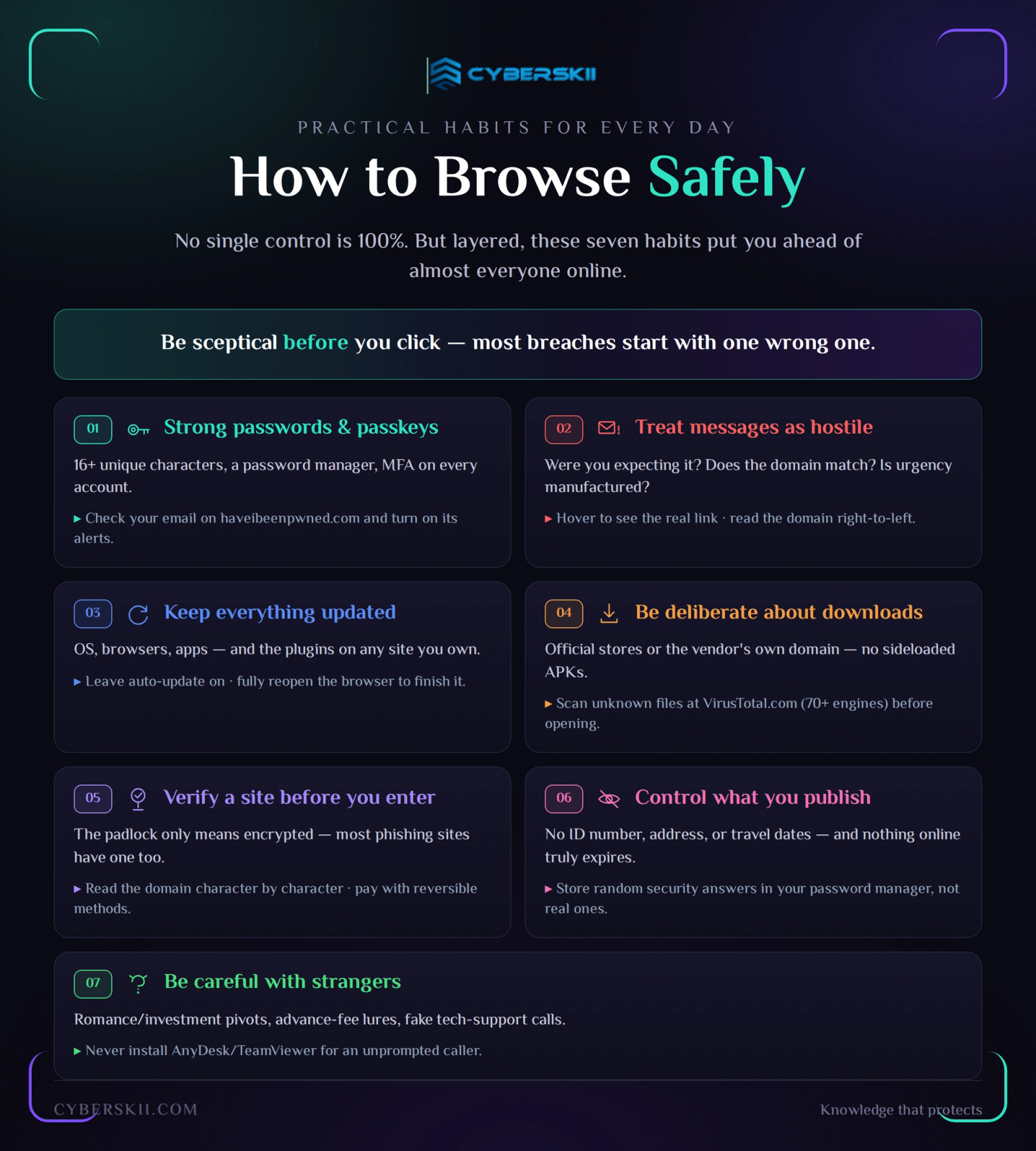
1. Use Strong, Unique Passwords — and Move to Passkeys
The rule
Length beats complexity: 16 characters or more, unique to every service. Uniqueness matters more than composition, because the dominant attack is credential stuffing — reusing a password leaked from one breached site against your email, bank, and workplace.
Use a manager
Bitwarden (free, open source, audited) or 1Password (paid, better shared-vault and family experience). Generate every password inside the manager; never store them in a browser profile you also use on shared machines.
Adopt passkeys
Apple, Google, and Microsoft all support passkeys, and adoption across major services has accelerated through 2025–2026. A passkey is a cryptographic key pair bound to the site's domain: nothing reusable is transmitted, nothing can be typed into a fake page, and phishing simply fails. Where passkeys are not yet offered, enable MFA — an authenticator app or hardware key, not SMS, which is vulnerable to SIM swapping.
Verify exposure
Check your addresses on haveibeenpwned.com and enable its notification service so future breaches reach you before the criminals act on them.
2. Treat Unexpected Messages as Hostile Until Proven Otherwise
Four questions before any click
- Was I expecting this?
- Does the sender's full address match the real domain?
- Does the link's destination match the brand?
- Is urgency being manufactured?
Inspect the link
On desktop, hover to reveal the true destination in the status bar. On mobile, press and hold to preview the URL. Read the domain from right to left: in secure-login.bank.attacker.com, the domain that matters is attacker.com.
Know the pressure levers
"Your account will be suspended," "unusual activity detected," "confirm within 24 hours," "the CEO needs this transfer before the close of business." Phishing works on emotion and deadline, not on technology.
Use the filters, but do not rely on them
Gmail and Outlook apply machine-learning phishing detection; a meaningful share still lands in the inbox, particularly targeted messages sent in low volume.
3. Keep Everything Updated
1- Operating systems — Windows Update, macOS Software Update, iOS, Android: leave automatic updates enabled and install security patches promptly.
2- Browsers — Chrome, Edge, Firefox, and Safari patch actively exploited flaws regularly; a fully closed and reopened browser is what finishes the update.
3- Applications — enable auto-update in the platform's app store.
4- Websites you own — WordPress, Magento, and Joomla installations are compromised through outdated plugins far more often than through the core platform. Patch plugins and themes, and remove those you no longer use.
4. Be Deliberate About Downloads
Install from official sources — the Apple App Store, Google Play, the Microsoft Store, or the vendor's own domain. Avoid sideloaded APKs from forums and link aggregators.
Privacy and security tools are among the most commonly impersonated software of all: fake builds of Tor Browser, VPN clients, and torrent clients are a reliable malware delivery route. Always download from the project's official site.
Before opening anything you are unsure about, scan it at VirusTotal.com, which checks the file against more than 70 antivirus engines. Treat a handful of detection as a reason to stop, not a rounding error.
5. Verify a Site Before You Enter Anything
HTTPS is necessary, not sufficient.
The padlock means the connection is encrypted, nothing more; the large majority of phishing sites now use valid certificates. Read the domain itself, character by character.
Inspect the certificate
For banking or payment pages: click the padlock, open the certificate details, and confirm the issued-to organisation matches the institution you expect.
Pay in ways that can be reversed
Credit cards carry chargeback rights; tokenised wallets such as Apple Pay, Google Pay, and mada Pay never expose the card number to the merchant. Bank transfers and crypto payments are effectively final — which is exactly why fraudsters ask for them.
6. Control What You Publish
- Personal data — avoid posting your national ID number, full address, phone number, travel dates, or photographs of documents and payment cards.
- Security answers — "my first pet," "my mother's maiden name," and "the street I grew up on" are all recoverable from an average social profile. Store random answers in your password manager instead of truthful ones.
- Aggregation risk — individually harmless posts combine into a complete profile for social engineering. The 533-million-record Facebook dataset that continues to circulate is a standing reminder that scraped and breached data does not expire.
- Permanence — assume anything published can be screenshotted, archived, and surfaced years later. Deletion removes it from the platform, not from the internet.
7. Be Careful With Strangers
- Romance and investment fraud — the tell is the pivot: an emotional relationship that moves toward a financial opportunity, an app you are asked to install outside the official stores, or a platform where withdrawals suddenly require a "tax" or "unlock fee."
- Advance-fee fraud — the "Nigerian prince" formula is decades old and still effective: a large sum awaits you, and only a small payment stands in the way.
- Tech-support scams — no legitimate company will call you unprompted and ask you to install AnyDesk, TeamViewer, or any other remote-access tool. Granting that access hands over the device.
Enabling Safe Browsing, Layer by Layer
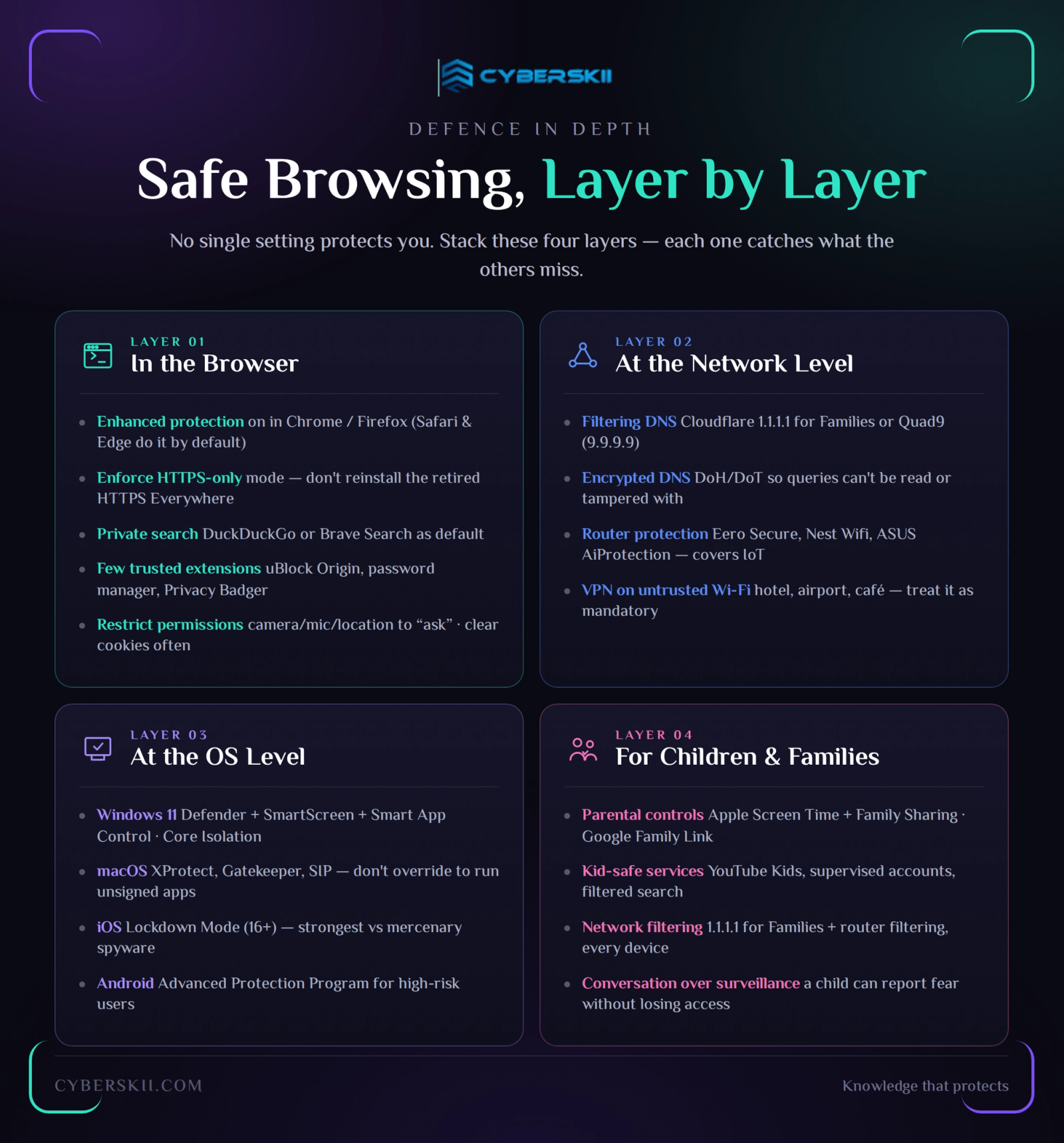
At the Browser Level
1- Turn on enhanced protection.
- Chrome: Settings → Privacy and security → Safe Browsing → Enhanced protection.
- Firefox: Settings → Privacy & Security → Deceptive Content and Dangerous Software Protection.
- Safari and Edge enable equivalent protections (Fraudulent Website Warning, SmartScreen) by default.
2- Enforce HTTPS.
Enable Always Use Secure Connections in Chrome or HTTPS-Only Mode in Firefox. (The old HTTPS Everywhere extension was retired in 2023 precisely because browsers now do this natively — do not install copies of it.)
3- Choose a private search engine
DuckDuckGo or Brave Search — under Default search engine.
4- Install few extensions, and only trusted ones
uBlock Origin, your password manager, Privacy Badger. Every extension is code with access to the pages you visit; audit the list quarterly and remove what you no longer use.
5- Restrict site permissions
Under Site settings, keep camera, microphone, location, and notifications set to "ask" and revoke anything granted to a site you no longer trust.
6- Clear cookies periodically
Immediately after using a shared or public device.
At the Network Level
1- Filtering DNS — Cloudflare 1.1.1.1 for Families blocks malware (and optionally adult content); Quad9 (9.9.9.9) blocks known malicious domains using commercial threat intelligence. One setting protects every device on the network.
2- Encrypted DNS (DoH/DoT) — prevents your queries from being read or tampered with in transit; supported natively in every major browser and operating system, and configurable network-wide with Pi-hole or a modern router.
3- Router-level protection — Eero Secure, Google Nest Wifi, or an ASUS router with AiProtection extends filtering to devices that cannot run security software, including smart TVs and IoT hardware.
4- VPN on untrusted networks — on hotel, airport, and café Wi-Fi, treat a reputable VPN as mandatory rather than optional.
At the Operating System Level
1- Windows 11 — Microsoft Defender, SmartScreen, and Smart App Control cover most users well; enable Core Isolation and keep Controlled Folder Access on for ransomware resistance.
2- MacOS — XProtect, Gatekeeper, and System Integrity Protection are strong by default; the main risk is a user overriding them to install unsigned software.
3- iOS — Lockdown Mode (iOS 16 and later) is the strongest available defence against mercenary spyware, intended for journalists, activists, and high-profile executives.
4- Android — the Advanced Protection Program hardens accounts and devices for high-risk users, requiring hardware security keys or passkeys for sign-in.
For Children and Families
- Parental controls — Apple Screen Time with Family Sharing; Google Family Link for Android and Chromebooks.
- Child-appropriate services — YouTube Kids and supervised accounts, with search restricted to a filtered engine.
- Network-level filtering — Cloudflare 1.1.1.1 for Families combined with router filtering protects every device in the home, including guests' devices and consoles.
- Conversation over surveillance — the control that works best long-term is a household agreement that a child can report something frightening without losing device access.
New in 2026: What Changed
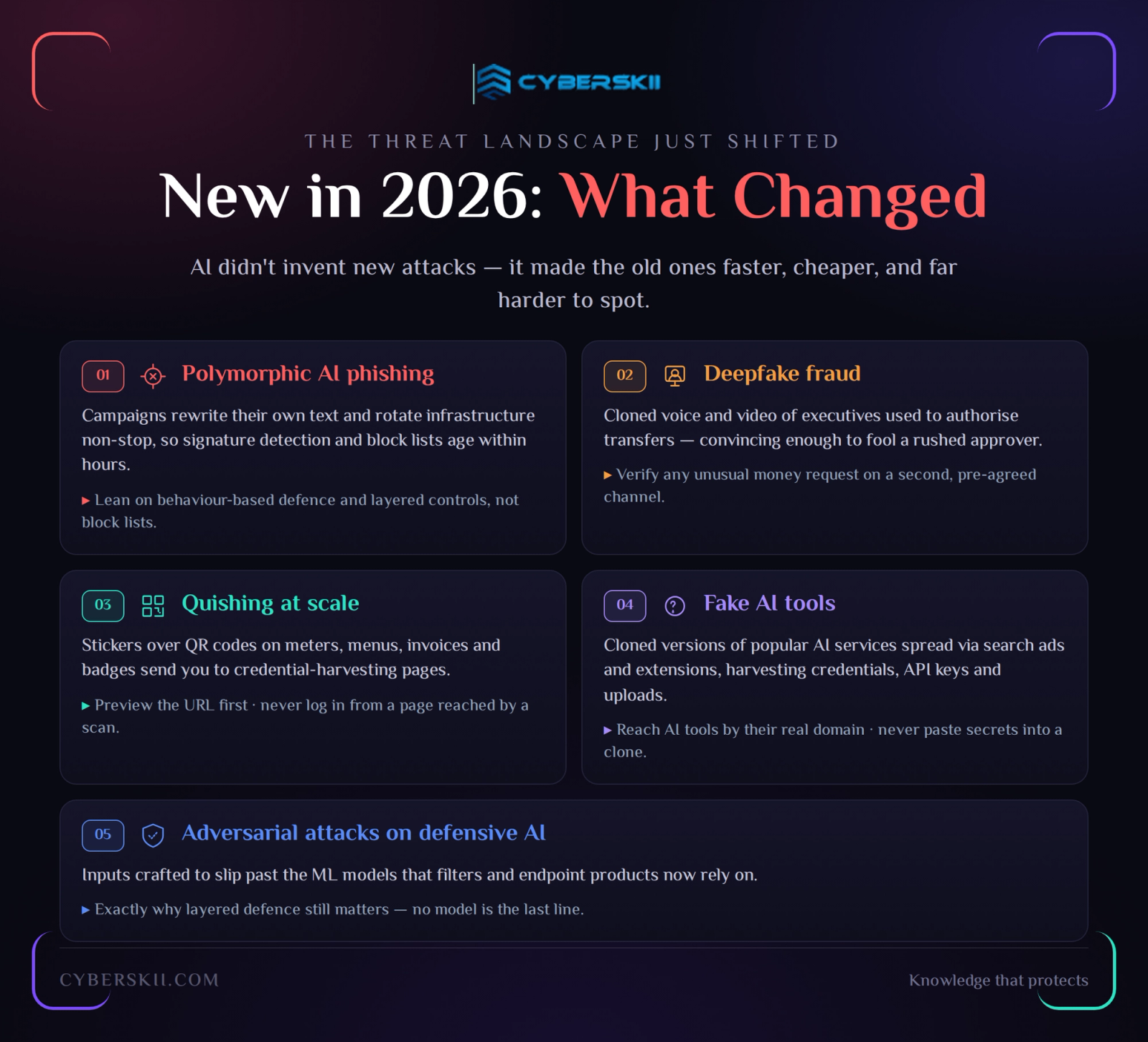
- Polymorphic, AI-generated phishing — campaigns that rewrite their own text and rotate infrastructure continuously, so signature-based detection and static block lists age within hours.
- Deepfake fraud — cloned voices and video of executives used to authorise transfers. The countermeasure is procedural, not technical: verify any unusual financial instruction through a second, pre-agreed channel, regardless of how convincing the request sounds.
- Quishing at scale — QR codes on parking meters, restaurant tables, invoices, and conference badges, replaced with stickers that lead to credential-harvesting pages. Preview the URL before opening, and never authenticate from a page reached by scanning a code.
- Fake AI tools — cloned versions of popular AI services, distributed through search ads and browser extensions, harvesting credentials, API keys, and uploaded documents.
- Adversarial attacks on defensive AI — inputs crafted to evade the machine-learning models that filters and endpoint products now depend on, which is why layered defence still matters.
Summary: Safe Browsing Is a System, Not a Setting
Safe browsing in 2026 is not a single switch. It is a stack, and each layer buys down the probability that a mistake becomes an incident: HTTPS, encrypted and filtering DNS, a password manager with passkeys, MFA, a VPN on untrusted networks, endpoint protection, and a content blocker. No combination reaches 100% — but someone running these seven layers is meaningfully harder to compromise than the overwhelming majority of internet users.
The governing habit is simpler than any of the tools: be sceptical before you click. The large majority of breaches begin with a person taking one reasonable-looking action on a page built to look reasonable. Vigilance costs nothing; its absence can cost years.
CyberSkii delivers safe-browsing awareness programmes, browser and endpoint hardening for Saudi organisations. Talk to us about securing the browsing experience across your organisation — and your family.